Print one card design.
Multiple copies per sheet.
For home or in-shop printing. Repeat one finished card image at your chosen dimensions, then print or save a PDF through your browser’s print dialog. Your image stays in this browser.
How to print multiple copies on one sheet
- Start with one finished card image. Choose a PNG, JPEG or WebP. If your file already contains a whole sheet of cards, that whole sheet will be repeated as one image; this tool does not split it into separate cards. PDF input is not supported.
- Set the paper and finished card size. Choose A4 or US Letter and the orientation you will print. Select a card preset, or choose Custom and enter its width and height in mm or inches. “Total cards” is the number of cards across all sheets.
- Check the preview, then print a test. Use Print / save as PDF. Match the paper size and orientation, select 1 page per sheet, use 100% / actual size, and turn off headers and footers. The cards are already arranged on each sheet; a second multiple-pages-per-sheet setting can shrink the entire layout. If your browser offers Original or Simplified formatting, keep Original.
Layout example: 85 × 55 mm cards on portrait A4, with a 10 mm margin and 3 mm gap, fit 8 cards per sheet. A total of 17 cards uses 3 sheets: 8 + 8 + 1. This is a calculated layout; measure one physical test sheet with a ruler before making a batch.
Browser option names vary. Mozilla’s Firefox printing guide ↗ explains paper, scale and pages-per-sheet options. PDF examples below were checked in Chrome on macOS. Other browsers and physical printer output have not been tested.
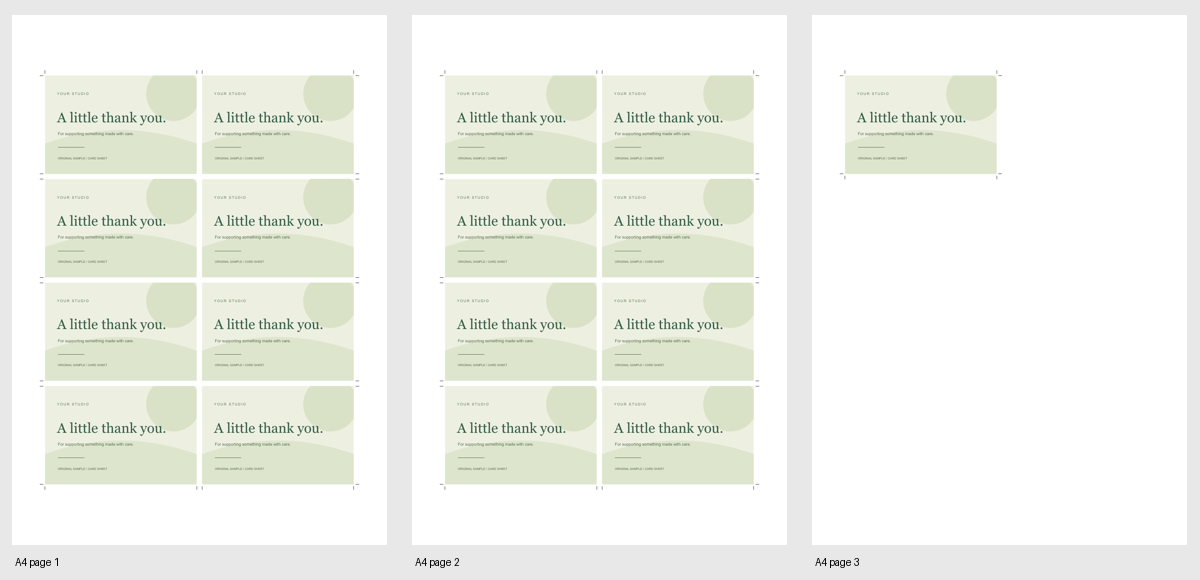
Checked PDF examples · 19 October 2026: Saved through Chrome 155 on macOS with “Save as PDF” and 1 page per sheet. The A4 example contains 8 + 8 + 1 cards. A second test with an original PNG, Letter landscape and 3.5 × 2 in cards contains 6 + 6 + 1 cards. Open the 3-page Letter PDF (23 KB) ↗
We reopened both PDFs and checked page counts, card positions, dimensions and cutting guides. In these files, page and card dimensions were within 0.2 mm of the chosen sizes; browser rounding can cause small differences. This is a file check, not a physical print guarantee. Check your own saved PDF and measure a test sheet before making a batch.
One PNG, JPEG or WebP image · up to 20 MB and 30 million pixels. Use artwork you have permission to print. SVG and PDF input are not supported.
No account or image upload. No external fonts or remote images. Closing this page clears your image.
Off. Card editing and printing work without measurement.
Usage measurement details
Only while checked, we send a page opt-in, successful image loads and print requests, with a broad traffic category. Images, filenames, card text and full URLs are not sent. Sample and blank cards are excluded from image and print counts. A print request does not confirm printing or PDF saving.
Consent and a random measurement token stay in memory for this page. We use daily event counts and remove records older than 60 days when a new event is received. Uncheck to stop future measurement; previously sent counts remain. No measurement cookies or saved consent. Hosting providers may process information for delivery and security.
Choose the matching paper size and orientation, and 1 page per sheet. Use 100% / actual size, turn off headers and footers, and avoid “Fit to page”. Check the test sheet with a ruler before cutting. Printer margins and feed alignment vary. Physical printer output has not been tested.
What this free beta does
It repeats one finished image without cropping it. Different aspect ratios leave white space inside the card. It does not remove backgrounds, create bleed, change image colours, or align double-sided prints. Cutting guides indicate the finished card edges.
This beta does not prepare or validate artwork for a print shop. The sample artwork and layout are original; third-party templates and card designs are not included.
Ordering from a print shop instead? Follow its specifications. Read the bleed, trim and safe-area guide →